Recipe Delete Duplicate Recipes3
Goal: Delete all but one of any recipes in the Broccoli app that are exact duplicates, ensuring at least one instance of each unique recipe remains
Goal: Delete all but one of any recipes in the Broccoli app that are exact duplicates, ensuring at least one instance of each unique recipe remains
user: None
The current subgoal explicitly states to "Open the Broccoli app using the open_app action." This directly translates to the `open_app` atomic action with the argument "Broccoli".
open_app(text="Broccoli")
Opening the Broccoli app.
Opening the Broccoli app.
The current subgoal is to "Open the first 'Avocado Toast with Egg' recipe". Looking at the clickable UI elements, element 11 is a CardView containing "Avocado Toast with Egg" (element 13) and its description (element 14). This is the first instance of "Avocado Toast with Egg" in the list. Therefore, I should click on element 11 to open this recipe.
click(index=11)
Clicking on the first "Avocado Toast with Egg" recipe card.
Clicking on the first "Avocado Toast with Egg" recipe card.
The current subgoal explicitly states to "Go back to the All recipes list." and provides the next action as "click(index=5) 'Navigate up'". I need to find the element with index 5 and perform a click action on it. Element 5 is indeed "ImageButton: 'Navigate up'".
click(index=5)
Clicking the "Navigate up" button to go back to the All recipes list.
Clicking the "Navigate up" button to go back to the All recipes list.
The current subgoal is to "Open the second “Avocado Toast with Egg” card to view full details. [Next action: click(index=16)]". The required atomic action is `click`. The target element is specified by `index=16`.
click(index=16)
Clicking the second "Avocado Toast with Egg" recipe card to view its details.
Clicking the second "Avocado Toast with Egg" recipe card to view its details.
The current subgoal explicitly states to "Go back to the All recipes list. [Next action: click(index=5) "Navigate up"]". This means I need to perform a `click` action on the element with `index=5`.
click(index=5)
Clicking the "Navigate up" button to go back to the All recipes list.
Clicking the "Navigate up" button to go back to the All recipes list.
The current subgoal is to "Open the third “Avocado Toast with Egg” card to view full details. [Next action: click(index=21)]". The action specified is `click` and the target index is `21`.
click(index=21)
Clicking the third "Avocado Toast with Egg" recipe card.
Clicking the third "Avocado Toast with Egg" recipe card.
The current subgoal is "1) Go back to the All recipes list. [Next action: click(index=5) "Navigate up"]". The atomic action required is a `click`. The target element is "Navigate up" with index 5. Therefore, I need to execute `click(index=5)`.
click(index=5)
Clicking the "Navigate up" button to go back to the All recipes list.
Clicking the "Navigate up" button to go back to the All recipes list.
The current subgoal is to "Open the first 'BBQ Chicken Quesadillas' card to view details." The action specified is `click(index=26)`. I will execute a click action on the element with index 26.
click(index=26)
Clicking the first "BBQ Chicken Quesadillas" recipe card to view its details.
Clicking the first "BBQ Chicken Quesadillas" recipe card to view its details.
The current subgoal explicitly states to "Go back to the All recipes list. [Next action: click(index=5) "Navigate up"]". This requires a `click` action on the element with `index=5`.
click(index=5)
Clicking the "Navigate up" button to go back to the All recipes list.
Clicking the "Navigate up" button to go back to the All recipes list.
The current subgoal is to "Open the second 'BBQ Chicken Quesadillas' card to view details." The action specified is `click(index=31)`. I will execute a click action on the element with index 31, which corresponds to the second "BBQ Chicken Quesadillas" card.
click(index=31)
Clicking the second "BBQ Chicken Quesadillas" recipe card to view its details.
Clicking the second "BBQ Chicken Quesadillas" recipe card to view its details.
The current subgoal is to "Go back to the All recipes list." The instruction explicitly states to "click(index=5) "Navigate up"". I will perform a click action on the element with index 5.
click(index=5)
Clicking the "Navigate up" button to go back to the All recipes list.
Clicking the "Navigate up" button to go back to the All recipes list.
The current subgoal explicitly states to "Scroll down the All recipes list". This translates directly to a `swipe` action. I need to identify a suitable starting and ending coordinate for the swipe to scroll down the `RecyclerView` which contains the recipe list. The `RecyclerView` is element 10, with bounds (0, 422, 1080, 2337). I will choose a starting point near the bottom of the visible list and an ending point higher up to simulate a scroll down.
swipe(coordinate=[540, 1800]coordinate2=[540, 600])
Swiping down the "All recipes" list to reveal more recipes.
Swiping down the "All recipes" list to reveal more recipes.
The current subgoal is to "Open the first 'Butternut Squash Soup' card to view full details. [Next action: click(index=19)]". The atomic action required is `click`. The target is specified by `index=19`. Therefore, I need to perform a click action on the element with index 19.
click(index=19)
Clicking the first "Butternut Squash Soup" recipe card to view its details.
Clicking the first "Butternut Squash Soup" recipe card to view its details.
The current subgoal explicitly states to "Go back to the All recipes list. [Next action: click(index=5) "Navigate up"]". This requires a `click` action. The target element is identified by `index=5` and the text "Navigate up".
click(index=5)
Clicking the "Navigate up" button to go back to the All recipes list.
Clicking the "Navigate up" button to go back to the All recipes list.
The current subgoal explicitly states to "Open the second 'Butternut Squash Soup' card to view details. [Next action: click(index=24)]". I need to perform a click action on the element with index 24.
click(index=24)
Clicking the second "Butternut Squash Soup" recipe card to view its details.
Clicking the second "Butternut Squash Soup" recipe card to view its details.
The current subgoal is to "Go back to the All recipes list." The action specified is "click(index=5) 'Navigate up'". I need to perform a click action on the element with index 5.
click(index=5)
Clicking the "Navigate up" button to go back to the All recipes list.
Clicking the "Navigate up" button to go back to the All recipes list.
The current subgoal is to "Open the third “Butternut Squash Soup” card to view details. [Next action: click(index=29)]". This directly translates to a `click` action on the element with index 29.
click(index=29)
Clicking the third "Butternut Squash Soup" recipe card to view its details.
Clicking the third "Butternut Squash Soup" recipe card to view its details.
The current subgoal is to go back to the All recipes list by clicking "Navigate up". The next action specified is `click(index=5) "Navigate up"`. I will execute a click action on the element with index 5.
click(index=5)
Clicking the "Navigate up" button to go back to the All recipes list.
Clicking the "Navigate up" button to go back to the All recipes list.
The current subgoal is to open the fourth "Butternut Squash Soup" entry. The instruction explicitly states "Next action: click(index=34)". I will perform a click action on the element with index 34.
click(index=34)
Clicking the fourth "Butternut Squash Soup" recipe card to view its details.
Clicking the fourth "Butternut Squash Soup" recipe card to view its details.
The current subgoal is to "Go back to the All recipes list." The instruction explicitly states to "click(index=5) 'Navigate up'". I will perform a click action on the element with index 5.
click(index=5)
Clicking the "Navigate up" button to go back to the All recipes list.
Clicking the "Navigate up" button to go back to the All recipes list.
The current subgoal is to "Open the fifth 'Butternut Squash Soup' entry to view details. [Next action: click(index=41)]". The action required is a click, and the target is the element at index 41.
click(index=41)
Clicking the fifth "Butternut Squash Soup" recipe card to view its details.
Clicking the fifth "Butternut Squash Soup" recipe card to view its details.
The current subgoal explicitly states to "Go back to the All recipes list." and specifies the action as "click(index=5) 'Navigate up'". I need to perform a click action on the element with index 5.
click(index=5)
Clicking the "Navigate up" button to go back to the All recipes list.
Clicking the "Navigate up" button to go back to the All recipes list.
The current subgoal is to "Scroll down to reveal more recipes. [Next action: swipe from (540,1800) to (540,600)]". 1. **Atomic Action:** The action specified is "swipe". 2. **Target/Location:** The target is to scroll down, and the specific coordinates for the swipe are provided: `from (540,1800) to (540,600)`. 3. **Parameters:** The `swipe` action requires two coordinate parameters: `coordinate` (start point) and `coordinate2` (end point).
swipe(coordinate=[540, 1800]coordinate2=[540, 600])
Swiping down from (540,1800) to (540,600) to reveal more recipes.
Swiping down from (540,1800) to (540,600) to reveal more recipes.
The current subgoal is to "Open the top “Butternut Squash Soup” card to capture its full details." The instruction explicitly states to use `click(index=11)`. I will perform a click action on the element with index 11.
click(index=11)
Clicking the top "Butternut Squash Soup" recipe card to view its details.
Clicking the top "Butternut Squash Soup" recipe card to view its details.
The current subgoal is to "Tap More options". I need to find the element labeled "More options" and perform a click action on it. Based on the provided UI elements, element 7 is "ImageView: "More options"".
click(index=7)
Tapping the "More options" icon to open the overflow menu.
Tapping the "More options" icon to open the overflow menu.
The current subgoal is to "Tap 'Delete' in the overflow menu to remove this exact duplicate." The next action specified is `click(index=10)`. I need to perform a click action on the element with index 10, which corresponds to the "Delete" text.
click(index=10)
Clicking the "Delete" option in the overflow menu.
Clicking the "Delete" option in the overflow menu.
The current subgoal explicitly states to "Confirm the deletion by tapping DELETE in the dialog." I need to locate the "DELETE" button in the provided UI elements and perform a click action on it. Based on the device state, the "DELETE" button is listed with index 5.
click(index=5)
Tapping the "DELETE" button to confirm the recipe deletion.
Tapping the "DELETE" button to confirm the recipe deletion.
The current subgoal is to "Open the top “Butternut Squash Soup” card to view its details and capture all fields. [Next action: click(index=11)]". The action required is "click". The target element is specified by "index=11". Therefore, I need to perform a click action on the element with index 11.
click(index=11)
Clicking the top "Butternut Squash Soup" recipe card to view its details.
Clicking the top "Butternut Squash Soup" recipe card to view its details.
The current subgoal is to "Open the overflow menu to delete this exact duplicate." The instruction explicitly states to "click(index=7) 'More options'". I need to perform a click action on the element with index 7.
click(index=7)
Clicking the "More options" icon to open the overflow menu.
Clicking the "More options" icon to open the overflow menu.
The current subgoal explicitly states to "Tap "Delete" in the overflow menu. [Next action: click(index=10)]". The device state shows a "Delete" option with index 10. Therefore, the required atomic action is a click, and the target is index 10.
click(index=10)
Tapping the "Delete" option in the overflow menu.
Tapping the "Delete" option in the overflow menu.
The current subgoal explicitly states to "Confirm deletion by tapping DELETE on the dialog." I need to locate the "DELETE" button in the provided UI elements and perform a click action on it. The element with index 5 is a button with the text "DELETE".
click(index=5)
Tapping the "DELETE" button to confirm the recipe deletion.
Tapping the "DELETE" button to confirm the recipe deletion.
The current subgoal explicitly states to "Open the top 'Butternut Squash Soup' card". Based on the provided UI elements, the top "Butternut Squash Soup" card is element 11. The action to "open" an element is a "click".
click(index=11)
Clicking the top "Butternut Squash Soup" recipe card to view its details.
Clicking the top "Butternut Squash Soup" recipe card to view its details.
The current subgoal is to "Go back to the All recipes list." The instruction specifies to "click(index=5) 'Navigate up'". I will perform a click action on the element with index 5, which is the "Navigate up" button.
click(index=5)
Clicking the "Navigate up" button to go back to the All recipes list.
Clicking the "Navigate up" button to go back to the All recipes list.
The current subgoal is to "Open the second visible “Butternut Squash Soup” card to capture its details." The instruction explicitly states to use `click(index=16)`. I will perform a click action on the element with index 16.
click(index=16)
Clicking the second visible "Butternut Squash Soup" card.
Clicking the second visible "Butternut Squash Soup" card.
The current subgoal explicitly states to "Go back to the All recipes list" by performing a "click(index=5) 'Navigate up'" action. I will execute a click action on the element with index 5.
click(index=5)
Clicking the "Navigate up" button to go back to the All recipes list.
Clicking the "Navigate up" button to go back to the All recipes list.
The current subgoal is to "Open the next 'Butternut Squash Soup' card (third visible) to view details. [Next action: click(index=21)]". The action specified is `click` and the target index is `21`.
click(index=21)
Clicking the third visible "Butternut Squash Soup" recipe card to view its details.
Clicking the third visible "Butternut Squash Soup" recipe card to view its details.
The current subgoal explicitly states to "Go back to the All recipes list. [Next action: click(index=5) "Navigate up"]". I need to perform a click action on the element with index 5.
click(index=5)
Clicking the "Navigate up" button to go back to the All recipes list.
Clicking the "Navigate up" button to go back to the All recipes list.
The current subgoal explicitly states to "Scroll down past the soup entries to reveal more recipes. [Next action: swipe from (540,1800) to (540,600)]". This requires a `swipe` action with the given coordinates.
swipe(coordinate=[540, 1800]coordinate2=[540, 600])
Swiping down the screen to reveal more recipes.
Swiping down the screen to reveal more recipes.
The current subgoal is to "Open the first 'Grilled Cheese with Tomato and Basil' card to view details." The next action specified is `click(index=33)`. I will execute a click action on the element with index 33.
click(index=33)
Clicking the first "Grilled Cheese with Tomato and Basil" recipe card.
Clicking the first "Grilled Cheese with Tomato and Basil" recipe card.
The current subgoal is to navigate back to the "All recipes list". The instruction explicitly states to click "Navigate up" (index=5). I will perform a click action on the element with index 5.
click(index=5)
Clicking the "Navigate up" button to go back to the All recipes list.
Clicking the "Navigate up" button to go back to the All recipes list.
The current subgoal is to "Open the second 'Grilled Cheese with Tomato and Basil' card to view its details." The subgoal explicitly provides the action: `click(index=40)`. I will perform a click action on the element with index 40.
click(index=40)
Clicking the second "Grilled Cheese with Tomato and Basil" recipe card to view its details.
Clicking the second "Grilled Cheese with Tomato and Basil" recipe card to view its details.
The current subgoal is to compare the two "Grilled Cheese with Tomato and Basil" entries. The overall plan states that they differ and both should be kept. Therefore, no deletion action is required. The next step in the overall plan is to "Return to the All recipes list." To do this from the current recipe detail view, I need to click the "Navigate up" button.
click(index=5)
Clicking the "Navigate up" button to return to the All recipes list.
Clicking the "Navigate up" button to return to the All recipes list.
The current subgoal explicitly states to "swipe from (540,1800) to (540,600)". This directly translates to a `swipe` action with the given coordinates.
swipe(coordinate=[540, 1800]coordinate2=[540, 600])
Swiping down the All recipes list to reveal more recipes.
Swiping down the All recipes list to reveal more recipes.
The current subgoal explicitly states to "Open the first “Pan-Seared Salmon with Quinoa” card" and specifies the action as "click(index=35)". I will perform a click action on the element at index 35.
click(index=35)
Clicking the first "Pan-Seared Salmon with Quinoa" recipe card.
Clicking the first "Pan-Seared Salmon with Quinoa" recipe card.
The current subgoal is to "Go back to the All recipes list." The previous action was clicking a recipe card, which led to the current recipe detail screen. To go back to the list, I need to click the "Navigate up" button. Based on the provided UI elements, "Navigate up" is associated with index 5.
click(index=5)
Clicking the "Navigate up" button to go back to the All recipes list.
Clicking the "Navigate up" button to go back to the All recipes list.
The current subgoal is to "Open the second 'Pan-Seared Salmon with Quinoa' card to view details. [Next action: click(index=40)]". However, the provided next action `click(index=40)` refers to the CardView element, which contains the TextView at index 42. The instruction is to click the *second* "Pan-Seared Salmon with Quinoa" card. Looking at the clickable elements: - Element 37: TextView: "com.flauschcode.broccoli:id/card_text_view_title", "Pan-Seared Salmon with Quinoa" - (336, 1932, 1059, 2068) (This is the first one visible) - Element 40: CardView: "CardView" - (21, 2251, 1059, 2337) (This is the card for the second one) - Element 42: TextView: "com.flauschcode.broccoli:id/card_text_view_title", "Pan-Seared Salmon with Quinoa" - (336, 2268, 1059, 2337) (This is the title for the second one) The subgoal explicitly states `click(index=40)`. I will follow this instruction precisely.
click(index=40)
Clicking the second "Pan-Seared Salmon with Quinoa" recipe card to view its details.
Clicking the second "Pan-Seared Salmon with Quinoa" recipe card to view its details.
The current subgoal explicitly states to "Go back to the All recipes list. [Next action: click(index=5) "Navigate up"]". I need to perform a click action on the element with index 5, which is labeled "Navigate up".
click(index=5)
Clicking the "Navigate up" button to return to the All recipes list.
Clicking the "Navigate up" button to return to the All recipes list.
The current subgoal explicitly states to "Scroll down to the end of the All recipes list to reveal any remaining recipes. [Next action: swipe from (540,1800) to (540,600)]". This is a direct instruction for a swipe action with specified coordinates.
swipe(coordinate=[540, 1800]coordinate2=[540, 600])
Swiping down the All recipes list to reveal more recipes.
Swiping down the All recipes list to reveal more recipes.
The current subgoal explicitly states to "Scroll down to continue reviewing the remaining recipes." and provides the exact action: "swipe from (540,1800) to (540,600)". This is a direct instruction for a `swipe` action with the specified coordinates.
swipe(coordinate=[540, 1800]coordinate2=[540, 600])
Swiping down the All recipes list to reveal more recipes.
Swiping down the All recipes list to reveal more recipes.
The current subgoal explicitly states to "swipe from (540,1800) to (540,600)". This requires a `swipe` action with the given coordinates.
swipe(coordinate=[540, 1800]coordinate2=[540, 600])
Swiping down the All recipes list to reveal more recipes.
Swiping down the All recipes list to reveal more recipes.
The current subgoal explicitly states to "Scroll down to reveal the remaining recipes. [Next action: swipe from (540,1800) to (540,600)]". This requires a `swipe` action with the specified coordinates.
swipe(coordinate=[540, 1800]coordinate2=[540, 600])
Swiping down the All recipes list to reveal more recipes.
Swiping down the All recipes list to reveal more recipes.
The current subgoal is to "Scroll down to continue reviewing the remaining recipes to the very end of the list." This requires a `swipe` action. I will swipe from the middle bottom of the screen to the middle top to scroll down.
swipe(coordinate=[540, 1800]coordinate2=[540, 600])
Swiping down the All recipes list to reveal more recipes.
Swiping down the All recipes list to reveal more recipes.
The current subgoal is to scroll further down the "All recipes" list to reach the end. The appropriate atomic action for this is `swipe`. I need to specify a starting coordinate and an ending coordinate for the swipe. Since the goal is to scroll down, I will swipe from a lower y-coordinate to a higher y-coordinate. I will use the coordinates `[540, 1800]` as the starting point and `[540, 600]` as the ending point to scroll down the list.
swipe(coordinate=[540, 1800]coordinate2=[540, 600])
Swiping down the All recipes list to reveal more recipes.
Swiping down the All recipes list to reveal more recipes.
The current subgoal explicitly states to "swipe from (540,1800) to (540,600)". This directly maps to the `swipe` atomic action with the given coordinates.
swipe(coordinate=[540, 1800]coordinate2=[540, 600])
Swiping down the All recipes list to reveal more recipes.
Swiping down the All recipes list to reveal more recipes.
The current subgoal explicitly states to "Scroll further down to reach the end of the All recipes list. [Next action: swipe from (540,1800) to (540,600)]". This directly translates to a `swipe` action with the given coordinates.
swipe(coordinate=[540, 1800]coordinate2=[540, 600])
Swiping down the All recipes list to reveal more recipes.
Swiping down the All recipes list to reveal more recipes.
The current subgoal explicitly states to "swipe from (540,1800) to (540,600)". This translates directly to a `swipe` action with the provided coordinates.
swipe(coordinate=[540, 1800]coordinate2=[540, 600])
Swiping down the All recipes list to reveal more recipes.
Swiping down the All recipes list to reveal more recipes.
The current subgoal explicitly states to "swipe from (540,1800) to (540,600)". This translates directly to a `swipe` action with the given coordinates.
swipe(coordinate=[540, 1800]coordinate2=[540, 600])
Swiping down the All recipes list to reveal more recipes.
Swiping down the All recipes list to reveal more recipes.
The current subgoal is to "Scroll down further to reach the end of the All recipes list. [Next action: swipe from (540,1800) to (540,600)]". This directly translates to a `swipe` action with the given coordinates.
swipe(coordinate=[540, 1800]coordinate2=[540, 600])
Swiping down the All recipes list to reveal more recipes.
Swiping down the All recipes list to reveal more recipes.
The current subgoal explicitly states to perform a swipe action with specific coordinates. I need to use the `swipe` action and provide the `coordinate` and `coordinate2` as specified.
swipe(coordinate=[540, 1800]coordinate2=[540, 600])
Swiping down the All recipes list to reveal more recipes.
Swiping down the All recipes list to reveal more recipes.
The current subgoal explicitly states to "Scroll down to reveal the remaining recipes. [Next action: swipe from (540,1800) to (540,600)]". This translates directly to a `swipe` action with the given coordinates.
swipe(coordinate=[540, 1800]coordinate2=[540, 600])
Swiping down the All recipes list to reveal more recipes.
Swiping down the All recipes list to reveal more recipes.
The current subgoal explicitly states to "Scroll down to reach the end of the All recipes list. [Next action: swipe from (540,1800) to (540,600)]". This directly translates to a `swipe` action with the given coordinates.
swipe(coordinate=[540, 1800]coordinate2=[540, 600])
Swiping down the All recipes list to reveal more recipes.
Swiping down the All recipes list to reveal more recipes.
The current subgoal explicitly states to "swipe from (540,1800) to (540,600)". This requires a `swipe` action with the given coordinates.
swipe(coordinate=[540, 1800]coordinate2=[540, 600])
Swiping down the All recipes list to reveal more recipes.
Swiping down the All recipes list to reveal more recipes.
The current subgoal explicitly states to "swipe from (540,1800) to (540,600)". This directly translates to a `swipe` action with the given coordinates.
swipe(coordinate=[540, 1800]coordinate2=[540, 600])
Swiping down the All recipes list to reveal more recipes.
Swiping down the All recipes list to reveal more recipes.
The current subgoal explicitly states to "swipe from (540,1800) to (540,600)". This directly translates to a `swipe` action with the specified coordinates.
swipe(coordinate=[540, 1800]coordinate2=[540, 600])
Swiping down the All recipes list to reveal more recipes.
Swiping down the All recipes list to reveal more recipes.
The current subgoal is to "Continue scrolling toward the end of the list to finish verification." This directly translates to a `swipe` action. I will use the same swipe coordinates as the previous successful actions to continue scrolling down the list.
swipe(coordinate=[540, 1800]coordinate2=[540, 600])
Swiping down the All recipes list to reveal more recipes.
Swiping down the All recipes list to reveal more recipes.
The current subgoal explicitly states to "swipe from (540,1800) to (540,600)". This requires a `swipe` action with the given coordinates.
swipe(coordinate=[540, 1800]coordinate2=[540, 600])
Swiping down the All recipes list to reveal more recipes.
Swiping down the All recipes list to reveal more recipes.
The current subgoal explicitly states to "Scroll further down to reveal the remaining recipes" and provides the exact action: "swipe from (540,1800) to (540,600)". This directly maps to the `swipe` atomic action with the specified coordinates.
swipe(coordinate=[540, 1800]coordinate2=[540, 600])
Swiping down the All recipes list to reveal more recipes.
Swiping down the All recipes list to reveal more recipes.
The current subgoal explicitly states to "swipe from (540,1800) to (540,600)". This is a direct instruction for a swipe action with specific coordinates.
swipe(coordinate=[540, 1800]coordinate2=[540, 600])
Swiping down the All recipes list to reveal more recipes.
Swiping down the All recipes list to reveal more recipes.
The current subgoal is to "Scroll further down to reveal the remaining recipes. [Next action: swipe from (540,1800) to (540,600)]". This directly translates to a `swipe` atomic action with the specified coordinates.
swipe(coordinate=[540, 1800]coordinate2=[540, 600])
Swiping down the All recipes list to reveal more recipes.
Swiping down the All recipes list to reveal more recipes.
The current subgoal is to scroll further down the "All recipes" list to reach the end. This requires a `swipe` action. I will swipe from the bottom part of the visible list upwards to reveal more content. I'll use coordinates that are within the scrollable area and away from the bottom navigation bar.
swipe(coordinate=[540, 1800]coordinate2=[540, 600])
Swiping down the All recipes list to reveal more recipes.
Swiping down the All recipes list to reveal more recipes.
The current subgoal explicitly states to "swipe from (540,1800) to (540,600)". This directly maps to the `swipe` atomic action with the given coordinates.
swipe(coordinate=[540, 1800]coordinate2=[540, 600])
Swiping down the All recipes list to reveal more recipes.
Swiping down the All recipes list to reveal more recipes.
The current subgoal explicitly states to "Continue scrolling toward the end of the All recipes list. [Next action: swipe from (540,1800) to (540,600)]". This directly translates to a `swipe` action with the given coordinates.
swipe(coordinate=[540, 1800]coordinate2=[540, 600])
Swiping down the All recipes list to reveal more recipes.
Swiping down the All recipes list to reveal more recipes.
The current subgoal is to "Scroll further down to reach the end of the All recipes list." This clearly indicates a `swipe` action. I will choose a starting coordinate in the lower part of the screen and an ending coordinate in the upper part to simulate a scroll-down gesture. A good starting point would be around the middle of the screen, towards the bottom, and an ending point higher up.
swipe(coordinate=[540, 1800]coordinate2=[540, 600])
Swiping down the All recipes list to reveal more recipes.
Swiping down the All recipes list to reveal more recipes.
The current subgoal explicitly states to "swipe from (540,1800) to (540,600)". This is a direct instruction for a `swipe` action.
swipe(coordinate=[540, 1800]coordinate2=[540, 600])
Swiping down the All recipes list to reveal more recipes.
Swiping down the All recipes list to reveal more recipes.
The current subgoal explicitly states to "swipe from (540,1800) to (540,600)". This requires a `swipe` action with the given start and end coordinates.
swipe(coordinate=[540, 1800]coordinate2=[540, 600])
Swiping down the All recipes list to reveal more recipes.
Swiping down the All recipes list to reveal more recipes.
The current subgoal is to "Scroll further down to move toward the end of the list. [Next action: swipe from (540,1800) to (540,600)]". This directly translates to a `swipe` action with the specified coordinates.
swipe(coordinate=[540, 1800]coordinate2=[540, 600])
Swiping down the All recipes list to reveal more recipes.
Swiping down the All recipes list to reveal more recipes.
The current subgoal is to scroll down the "All recipes" list. The action specified is a `swipe` from (540,1800) to (540,600). I will execute this action.
swipe(coordinate=[540, 1800]coordinate2=[540, 600])
Swiping down the All recipes list to reveal more recipes.
Swiping down the All recipes list to reveal more recipes.
The current subgoal explicitly states to "swipe from (540,1800) to (540,600)". This requires the `swipe` atomic action with the given coordinates.
swipe(coordinate=[540, 1800]coordinate2=[540, 600])
Swiping down the All recipes list to reveal more recipes.
Swiping down the All recipes list to reveal more recipes.
The current subgoal explicitly states to "swipe from (540,1800) to (540,600)". This directly maps to the `swipe` atomic action with the given coordinates.
swipe(coordinate=[540, 1800]coordinate2=[540, 600])
Swiping down the All recipes list to reveal more recipes.
Swiping down the All recipes list to reveal more recipes.
The current subgoal explicitly states to "swipe from (540,1800) to (540,600)". This translates directly to a `swipe` atomic action with the provided coordinates.
swipe(coordinate=[540, 1800]coordinate2=[540, 600])
Swiping down the All recipes list to reveal more recipes.
Swiping down the All recipes list to reveal more recipes.
The current subgoal explicitly states to "Scroll further down the All recipes list. [Next action: swipe from (540,1800) to (540,600)]". This requires a `swipe` action with the provided start and end coordinates.
swipe(coordinate=[540, 1800]coordinate2=[540, 600])
Swiping down the All recipes list to reveal more recipes.
Swiping down the All recipes list to reveal more recipes.
The current subgoal explicitly states to "Scroll further down to continue toward the end of the All recipes list. [Next action: swipe from (540,1800) to (540,600)]". This requires a `swipe` action with the given start and end coordinates.
swipe(coordinate=[540, 1800]coordinate2=[540, 600])
Swiping down the All recipes list to reveal more recipes.
Swiping down the All recipes list to reveal more recipes.
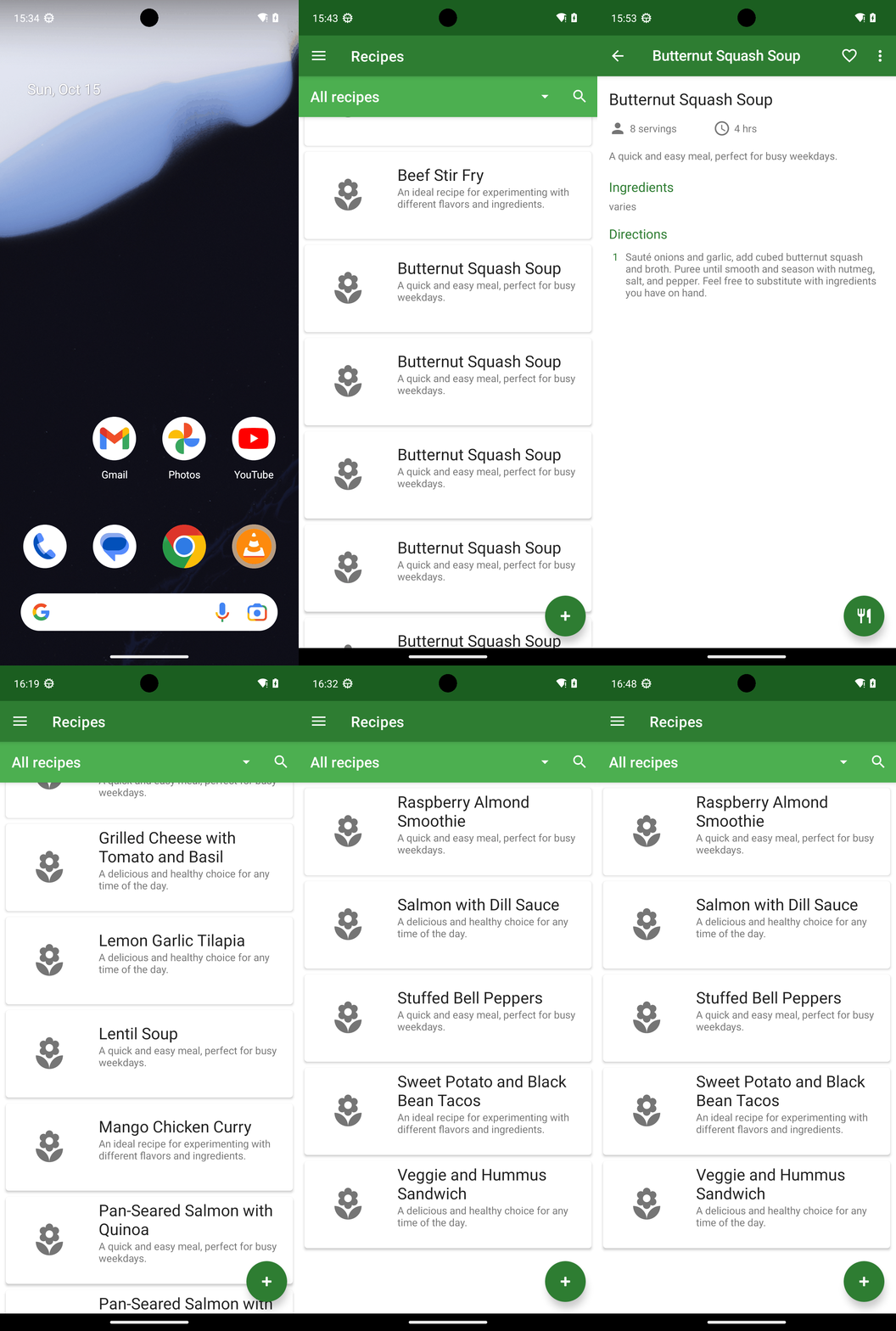
Completed: Removed all exact duplicate recipes while keeping one copy of each unique recipe.

Actions taken:
- Butternut Squash Soup:
  - Deleted 1 duplicate matching the 2 servings, 45 mins, “subject to change” ingredients, “Feel free to substitute…” directions version (duplicate of step 12).
  - Deleted 1 duplicate matching the 8 servings, 4 hrs, “varies” ingredients, “Feel free to substitute…” directions version (duplicate of step 11).
  - Verified remaining Butternut Squash Soup entries are unique (steps 9, 10, 11, 12, 13, and 20 represent distinct versions with differing fields).

- Verified no other exact duplicates:
  - Avocado Toast with Egg (3 entries): not exact duplicates (steps 2–4).
  - BBQ Chicken Quesadillas (2 entries): not exact duplicates (steps 5–6).
  - Grilled Cheese with Tomato and Basil (2 entries): not exact duplicates (steps 21–22).
  - Pan-Seared Salmon with Quinoa (2 entries): not exact duplicates (steps 23–25).

Final state:
- At least one instance of every unique recipe remains.
- No exact duplicate recipes remain in the Broccoli app.
complete_goal(message="Completed: Removed all exact duplicate recipes while keeping one copy of each unique recipe.

Actions taken:
- Butternut Squash Soup:
  - Deleted 1 duplicate matching the 2 servings, 45 mins, “subject to change” ingredients, “Feel free to substitute…” directions version (duplicate of step 12).
  - Deleted 1 duplicate matching the 8 servings, 4 hrs, “varies” ingredients, “Feel free to substitute…” directions version (duplicate of step 11).
  - Verified remaining Butternut Squash Soup entries are unique (steps 9, 10, 11, 12, 13, and 20 represent distinct versions with differing fields).

- Verified no other exact duplicates:
  - Avocado Toast with Egg (3 entries): not exact duplicates (steps 2–4).
  - BBQ Chicken Quesadillas (2 entries): not exact duplicates (steps 5–6).
  - Grilled Cheese with Tomato and Basil (2 entries): not exact duplicates (steps 21–22).
  - Pan-Seared Salmon with Quinoa (2 entries): not exact duplicates (steps 23–25).

Final state:
- At least one instance of every unique recipe remains.
- No exact duplicate recipes remain in the Broccoli app.")
GIF not available
Goal: Delete all but one of any recipes in the Broccoli app that are exact duplicates, ensuring at least one instance of each unique recipe remains
user: None
The current subgoal explicitly states to "Open the Broccoli app using the open_app action." This directly translates to the `open_app` atomic action with the argument "Broccoli".
open_app(text="Broccoli")
Opening the Broccoli app.
Opening the Broccoli app.
The current subgoal is to "Open the first 'Avocado Toast with Egg' recipe". Looking at the clickable UI elements, element 11 is a CardView containing "Avocado Toast with Egg" (element 13) and its description (element 14). This is the first instance of "Avocado Toast with Egg" in the list. Therefore, I should click on element 11 to open this recipe.
click(index=11)
Clicking on the first "Avocado Toast with Egg" recipe card.
Clicking on the first "Avocado Toast with Egg" recipe card.
The current subgoal explicitly states to "Go back to the All recipes list." and provides the next action as "click(index=5) 'Navigate up'". I need to find the element with index 5 and perform a click action on it. Element 5 is indeed "ImageButton: 'Navigate up'".
click(index=5)
Clicking the "Navigate up" button to go back to the All recipes list.
Clicking the "Navigate up" button to go back to the All recipes list.
The current subgoal is to "Open the second “Avocado Toast with Egg” card to view full details. [Next action: click(index=16)]". The required atomic action is `click`. The target element is specified by `index=16`.
click(index=16)
Clicking the second "Avocado Toast with Egg" recipe card to view its details.
Clicking the second "Avocado Toast with Egg" recipe card to view its details.
The current subgoal explicitly states to "Go back to the All recipes list. [Next action: click(index=5) "Navigate up"]". This means I need to perform a `click` action on the element with `index=5`.
click(index=5)
Clicking the "Navigate up" button to go back to the All recipes list.
Clicking the "Navigate up" button to go back to the All recipes list.
The current subgoal is to "Open the third “Avocado Toast with Egg” card to view full details. [Next action: click(index=21)]". The action specified is `click` and the target index is `21`.
click(index=21)
Clicking the third "Avocado Toast with Egg" recipe card.
Clicking the third "Avocado Toast with Egg" recipe card.
The current subgoal is "1) Go back to the All recipes list. [Next action: click(index=5) "Navigate up"]". The atomic action required is a `click`. The target element is "Navigate up" with index 5. Therefore, I need to execute `click(index=5)`.
click(index=5)
Clicking the "Navigate up" button to go back to the All recipes list.
Clicking the "Navigate up" button to go back to the All recipes list.
The current subgoal is to "Open the first 'BBQ Chicken Quesadillas' card to view details." The action specified is `click(index=26)`. I will execute a click action on the element with index 26.
click(index=26)
Clicking the first "BBQ Chicken Quesadillas" recipe card to view its details.
Clicking the first "BBQ Chicken Quesadillas" recipe card to view its details.
The current subgoal explicitly states to "Go back to the All recipes list. [Next action: click(index=5) "Navigate up"]". This requires a `click` action on the element with `index=5`.
click(index=5)
Clicking the "Navigate up" button to go back to the All recipes list.
Clicking the "Navigate up" button to go back to the All recipes list.
The current subgoal is to "Open the second 'BBQ Chicken Quesadillas' card to view details." The action specified is `click(index=31)`. I will execute a click action on the element with index 31, which corresponds to the second "BBQ Chicken Quesadillas" card.
click(index=31)
Clicking the second "BBQ Chicken Quesadillas" recipe card to view its details.
Clicking the second "BBQ Chicken Quesadillas" recipe card to view its details.
The current subgoal is to "Go back to the All recipes list." The instruction explicitly states to "click(index=5) "Navigate up"". I will perform a click action on the element with index 5.
click(index=5)
Clicking the "Navigate up" button to go back to the All recipes list.
Clicking the "Navigate up" button to go back to the All recipes list.
The current subgoal explicitly states to "Scroll down the All recipes list". This translates directly to a `swipe` action. I need to identify a suitable starting and ending coordinate for the swipe to scroll down the `RecyclerView` which contains the recipe list. The `RecyclerView` is element 10, with bounds (0, 422, 1080, 2337). I will choose a starting point near the bottom of the visible list and an ending point higher up to simulate a scroll down.
swipe(coordinate=[540, 1800]coordinate2=[540, 600])
Swiping down the "All recipes" list to reveal more recipes.
Swiping down the "All recipes" list to reveal more recipes.
The current subgoal is to "Open the first 'Butternut Squash Soup' card to view full details. [Next action: click(index=19)]". The atomic action required is `click`. The target is specified by `index=19`. Therefore, I need to perform a click action on the element with index 19.
click(index=19)
Clicking the first "Butternut Squash Soup" recipe card to view its details.
Clicking the first "Butternut Squash Soup" recipe card to view its details.
The current subgoal explicitly states to "Go back to the All recipes list. [Next action: click(index=5) "Navigate up"]". This requires a `click` action. The target element is identified by `index=5` and the text "Navigate up".
click(index=5)
Clicking the "Navigate up" button to go back to the All recipes list.
Clicking the "Navigate up" button to go back to the All recipes list.
The current subgoal explicitly states to "Open the second 'Butternut Squash Soup' card to view details. [Next action: click(index=24)]". I need to perform a click action on the element with index 24.
click(index=24)
Clicking the second "Butternut Squash Soup" recipe card to view its details.
Clicking the second "Butternut Squash Soup" recipe card to view its details.
The current subgoal is to "Go back to the All recipes list." The action specified is "click(index=5) 'Navigate up'". I need to perform a click action on the element with index 5.
click(index=5)
Clicking the "Navigate up" button to go back to the All recipes list.
Clicking the "Navigate up" button to go back to the All recipes list.
The current subgoal is to "Open the third “Butternut Squash Soup” card to view details. [Next action: click(index=29)]". This directly translates to a `click` action on the element with index 29.
click(index=29)
Clicking the third "Butternut Squash Soup" recipe card to view its details.
Clicking the third "Butternut Squash Soup" recipe card to view its details.
The current subgoal is to go back to the All recipes list by clicking "Navigate up". The next action specified is `click(index=5) "Navigate up"`. I will execute a click action on the element with index 5.
click(index=5)
Clicking the "Navigate up" button to go back to the All recipes list.
Clicking the "Navigate up" button to go back to the All recipes list.
The current subgoal is to open the fourth "Butternut Squash Soup" entry. The instruction explicitly states "Next action: click(index=34)". I will perform a click action on the element with index 34.
click(index=34)
Clicking the fourth "Butternut Squash Soup" recipe card to view its details.
Clicking the fourth "Butternut Squash Soup" recipe card to view its details.
The current subgoal is to "Go back to the All recipes list." The instruction explicitly states to "click(index=5) 'Navigate up'". I will perform a click action on the element with index 5.
click(index=5)
Clicking the "Navigate up" button to go back to the All recipes list.
Clicking the "Navigate up" button to go back to the All recipes list.
The current subgoal is to "Open the fifth 'Butternut Squash Soup' entry to view details. [Next action: click(index=41)]". The action required is a click, and the target is the element at index 41.
click(index=41)
Clicking the fifth "Butternut Squash Soup" recipe card to view its details.
Clicking the fifth "Butternut Squash Soup" recipe card to view its details.
The current subgoal explicitly states to "Go back to the All recipes list." and specifies the action as "click(index=5) 'Navigate up'". I need to perform a click action on the element with index 5.
click(index=5)
Clicking the "Navigate up" button to go back to the All recipes list.
Clicking the "Navigate up" button to go back to the All recipes list.
The current subgoal is to "Scroll down to reveal more recipes. [Next action: swipe from (540,1800) to (540,600)]". 1. **Atomic Action:** The action specified is "swipe". 2. **Target/Location:** The target is to scroll down, and the specific coordinates for the swipe are provided: `from (540,1800) to (540,600)`. 3. **Parameters:** The `swipe` action requires two coordinate parameters: `coordinate` (start point) and `coordinate2` (end point).
swipe(coordinate=[540, 1800]coordinate2=[540, 600])
Swiping down from (540,1800) to (540,600) to reveal more recipes.
Swiping down from (540,1800) to (540,600) to reveal more recipes.
The current subgoal is to "Open the top “Butternut Squash Soup” card to capture its full details." The instruction explicitly states to use `click(index=11)`. I will perform a click action on the element with index 11.
click(index=11)
Clicking the top "Butternut Squash Soup" recipe card to view its details.
Clicking the top "Butternut Squash Soup" recipe card to view its details.
The current subgoal is to "Tap More options". I need to find the element labeled "More options" and perform a click action on it. Based on the provided UI elements, element 7 is "ImageView: "More options"".
click(index=7)
Tapping the "More options" icon to open the overflow menu.
Tapping the "More options" icon to open the overflow menu.
The current subgoal is to "Tap 'Delete' in the overflow menu to remove this exact duplicate." The next action specified is `click(index=10)`. I need to perform a click action on the element with index 10, which corresponds to the "Delete" text.
click(index=10)
Clicking the "Delete" option in the overflow menu.
Clicking the "Delete" option in the overflow menu.
The current subgoal explicitly states to "Confirm the deletion by tapping DELETE in the dialog." I need to locate the "DELETE" button in the provided UI elements and perform a click action on it. Based on the device state, the "DELETE" button is listed with index 5.
click(index=5)
Tapping the "DELETE" button to confirm the recipe deletion.
Tapping the "DELETE" button to confirm the recipe deletion.
The current subgoal is to "Open the top “Butternut Squash Soup” card to view its details and capture all fields. [Next action: click(index=11)]". The action required is "click". The target element is specified by "index=11". Therefore, I need to perform a click action on the element with index 11.
click(index=11)
Clicking the top "Butternut Squash Soup" recipe card to view its details.
Clicking the top "Butternut Squash Soup" recipe card to view its details.
The current subgoal is to "Open the overflow menu to delete this exact duplicate." The instruction explicitly states to "click(index=7) 'More options'". I need to perform a click action on the element with index 7.
click(index=7)
Clicking the "More options" icon to open the overflow menu.
Clicking the "More options" icon to open the overflow menu.
The current subgoal explicitly states to "Tap "Delete" in the overflow menu. [Next action: click(index=10)]". The device state shows a "Delete" option with index 10. Therefore, the required atomic action is a click, and the target is index 10.
click(index=10)
Tapping the "Delete" option in the overflow menu.
Tapping the "Delete" option in the overflow menu.
The current subgoal explicitly states to "Confirm deletion by tapping DELETE on the dialog." I need to locate the "DELETE" button in the provided UI elements and perform a click action on it. The element with index 5 is a button with the text "DELETE".
click(index=5)
Tapping the "DELETE" button to confirm the recipe deletion.
Tapping the "DELETE" button to confirm the recipe deletion.
The current subgoal explicitly states to "Open the top 'Butternut Squash Soup' card". Based on the provided UI elements, the top "Butternut Squash Soup" card is element 11. The action to "open" an element is a "click".
click(index=11)
Clicking the top "Butternut Squash Soup" recipe card to view its details.
Clicking the top "Butternut Squash Soup" recipe card to view its details.
The current subgoal is to "Go back to the All recipes list." The instruction specifies to "click(index=5) 'Navigate up'". I will perform a click action on the element with index 5, which is the "Navigate up" button.
click(index=5)
Clicking the "Navigate up" button to go back to the All recipes list.
Clicking the "Navigate up" button to go back to the All recipes list.
The current subgoal is to "Open the second visible “Butternut Squash Soup” card to capture its details." The instruction explicitly states to use `click(index=16)`. I will perform a click action on the element with index 16.
click(index=16)
Clicking the second visible "Butternut Squash Soup" card.
Clicking the second visible "Butternut Squash Soup" card.
The current subgoal explicitly states to "Go back to the All recipes list" by performing a "click(index=5) 'Navigate up'" action. I will execute a click action on the element with index 5.
click(index=5)
Clicking the "Navigate up" button to go back to the All recipes list.
Clicking the "Navigate up" button to go back to the All recipes list.
The current subgoal is to "Open the next 'Butternut Squash Soup' card (third visible) to view details. [Next action: click(index=21)]". The action specified is `click` and the target index is `21`.
click(index=21)
Clicking the third visible "Butternut Squash Soup" recipe card to view its details.
Clicking the third visible "Butternut Squash Soup" recipe card to view its details.
The current subgoal explicitly states to "Go back to the All recipes list. [Next action: click(index=5) "Navigate up"]". I need to perform a click action on the element with index 5.
click(index=5)
Clicking the "Navigate up" button to go back to the All recipes list.
Clicking the "Navigate up" button to go back to the All recipes list.
The current subgoal explicitly states to "Scroll down past the soup entries to reveal more recipes. [Next action: swipe from (540,1800) to (540,600)]". This requires a `swipe` action with the given coordinates.
swipe(coordinate=[540, 1800]coordinate2=[540, 600])
Swiping down the screen to reveal more recipes.
Swiping down the screen to reveal more recipes.
The current subgoal is to "Open the first 'Grilled Cheese with Tomato and Basil' card to view details." The next action specified is `click(index=33)`. I will execute a click action on the element with index 33.
click(index=33)
Clicking the first "Grilled Cheese with Tomato and Basil" recipe card.
Clicking the first "Grilled Cheese with Tomato and Basil" recipe card.
The current subgoal is to navigate back to the "All recipes list". The instruction explicitly states to click "Navigate up" (index=5). I will perform a click action on the element with index 5.
click(index=5)
Clicking the "Navigate up" button to go back to the All recipes list.
Clicking the "Navigate up" button to go back to the All recipes list.
The current subgoal is to "Open the second 'Grilled Cheese with Tomato and Basil' card to view its details." The subgoal explicitly provides the action: `click(index=40)`. I will perform a click action on the element with index 40.
click(index=40)
Clicking the second "Grilled Cheese with Tomato and Basil" recipe card to view its details.
Clicking the second "Grilled Cheese with Tomato and Basil" recipe card to view its details.
The current subgoal is to compare the two "Grilled Cheese with Tomato and Basil" entries. The overall plan states that they differ and both should be kept. Therefore, no deletion action is required. The next step in the overall plan is to "Return to the All recipes list." To do this from the current recipe detail view, I need to click the "Navigate up" button.
click(index=5)
Clicking the "Navigate up" button to return to the All recipes list.
Clicking the "Navigate up" button to return to the All recipes list.
The current subgoal explicitly states to "swipe from (540,1800) to (540,600)". This directly translates to a `swipe` action with the given coordinates.
swipe(coordinate=[540, 1800]coordinate2=[540, 600])
Swiping down the All recipes list to reveal more recipes.
Swiping down the All recipes list to reveal more recipes.
The current subgoal explicitly states to "Open the first “Pan-Seared Salmon with Quinoa” card" and specifies the action as "click(index=35)". I will perform a click action on the element at index 35.
click(index=35)
Clicking the first "Pan-Seared Salmon with Quinoa" recipe card.
Clicking the first "Pan-Seared Salmon with Quinoa" recipe card.
The current subgoal is to "Go back to the All recipes list." The previous action was clicking a recipe card, which led to the current recipe detail screen. To go back to the list, I need to click the "Navigate up" button. Based on the provided UI elements, "Navigate up" is associated with index 5.
click(index=5)
Clicking the "Navigate up" button to go back to the All recipes list.
Clicking the "Navigate up" button to go back to the All recipes list.
The current subgoal is to "Open the second 'Pan-Seared Salmon with Quinoa' card to view details. [Next action: click(index=40)]". However, the provided next action `click(index=40)` refers to the CardView element, which contains the TextView at index 42. The instruction is to click the *second* "Pan-Seared Salmon with Quinoa" card. Looking at the clickable elements: - Element 37: TextView: "com.flauschcode.broccoli:id/card_text_view_title", "Pan-Seared Salmon with Quinoa" - (336, 1932, 1059, 2068) (This is the first one visible) - Element 40: CardView: "CardView" - (21, 2251, 1059, 2337) (This is the card for the second one) - Element 42: TextView: "com.flauschcode.broccoli:id/card_text_view_title", "Pan-Seared Salmon with Quinoa" - (336, 2268, 1059, 2337) (This is the title for the second one) The subgoal explicitly states `click(index=40)`. I will follow this instruction precisely.
click(index=40)
Clicking the second "Pan-Seared Salmon with Quinoa" recipe card to view its details.
Clicking the second "Pan-Seared Salmon with Quinoa" recipe card to view its details.
The current subgoal explicitly states to "Go back to the All recipes list. [Next action: click(index=5) "Navigate up"]". I need to perform a click action on the element with index 5, which is labeled "Navigate up".
click(index=5)
Clicking the "Navigate up" button to return to the All recipes list.
Clicking the "Navigate up" button to return to the All recipes list.
The current subgoal explicitly states to "Scroll down to the end of the All recipes list to reveal any remaining recipes. [Next action: swipe from (540,1800) to (540,600)]". This is a direct instruction for a swipe action with specified coordinates.
swipe(coordinate=[540, 1800]coordinate2=[540, 600])
Swiping down the All recipes list to reveal more recipes.
Swiping down the All recipes list to reveal more recipes.
The current subgoal explicitly states to "Scroll down to continue reviewing the remaining recipes." and provides the exact action: "swipe from (540,1800) to (540,600)". This is a direct instruction for a `swipe` action with the specified coordinates.
swipe(coordinate=[540, 1800]coordinate2=[540, 600])
Swiping down the All recipes list to reveal more recipes.
Swiping down the All recipes list to reveal more recipes.
The current subgoal explicitly states to "swipe from (540,1800) to (540,600)". This requires a `swipe` action with the given coordinates.
swipe(coordinate=[540, 1800]coordinate2=[540, 600])
Swiping down the All recipes list to reveal more recipes.
Swiping down the All recipes list to reveal more recipes.
The current subgoal explicitly states to "Scroll down to reveal the remaining recipes. [Next action: swipe from (540,1800) to (540,600)]". This requires a `swipe` action with the specified coordinates.
swipe(coordinate=[540, 1800]coordinate2=[540, 600])
Swiping down the All recipes list to reveal more recipes.
Swiping down the All recipes list to reveal more recipes.
The current subgoal is to "Scroll down to continue reviewing the remaining recipes to the very end of the list." This requires a `swipe` action. I will swipe from the middle bottom of the screen to the middle top to scroll down.
swipe(coordinate=[540, 1800]coordinate2=[540, 600])
Swiping down the All recipes list to reveal more recipes.
Swiping down the All recipes list to reveal more recipes.
The current subgoal is to scroll further down the "All recipes" list to reach the end. The appropriate atomic action for this is `swipe`. I need to specify a starting coordinate and an ending coordinate for the swipe. Since the goal is to scroll down, I will swipe from a lower y-coordinate to a higher y-coordinate. I will use the coordinates `[540, 1800]` as the starting point and `[540, 600]` as the ending point to scroll down the list.
swipe(coordinate=[540, 1800]coordinate2=[540, 600])
Swiping down the All recipes list to reveal more recipes.
Swiping down the All recipes list to reveal more recipes.
The current subgoal explicitly states to "swipe from (540,1800) to (540,600)". This directly maps to the `swipe` atomic action with the given coordinates.
swipe(coordinate=[540, 1800]coordinate2=[540, 600])
Swiping down the All recipes list to reveal more recipes.
Swiping down the All recipes list to reveal more recipes.
The current subgoal explicitly states to "Scroll further down to reach the end of the All recipes list. [Next action: swipe from (540,1800) to (540,600)]". This directly translates to a `swipe` action with the given coordinates.
swipe(coordinate=[540, 1800]coordinate2=[540, 600])
Swiping down the All recipes list to reveal more recipes.
Swiping down the All recipes list to reveal more recipes.
The current subgoal explicitly states to "swipe from (540,1800) to (540,600)". This translates directly to a `swipe` action with the provided coordinates.
swipe(coordinate=[540, 1800]coordinate2=[540, 600])
Swiping down the All recipes list to reveal more recipes.
Swiping down the All recipes list to reveal more recipes.
The current subgoal explicitly states to "swipe from (540,1800) to (540,600)". This translates directly to a `swipe` action with the given coordinates.
swipe(coordinate=[540, 1800]coordinate2=[540, 600])
Swiping down the All recipes list to reveal more recipes.
Swiping down the All recipes list to reveal more recipes.
The current subgoal is to "Scroll down further to reach the end of the All recipes list. [Next action: swipe from (540,1800) to (540,600)]". This directly translates to a `swipe` action with the given coordinates.
swipe(coordinate=[540, 1800]coordinate2=[540, 600])
Swiping down the All recipes list to reveal more recipes.
Swiping down the All recipes list to reveal more recipes.
The current subgoal explicitly states to perform a swipe action with specific coordinates. I need to use the `swipe` action and provide the `coordinate` and `coordinate2` as specified.
swipe(coordinate=[540, 1800]coordinate2=[540, 600])
Swiping down the All recipes list to reveal more recipes.
Swiping down the All recipes list to reveal more recipes.
The current subgoal explicitly states to "Scroll down to reveal the remaining recipes. [Next action: swipe from (540,1800) to (540,600)]". This translates directly to a `swipe` action with the given coordinates.
swipe(coordinate=[540, 1800]coordinate2=[540, 600])
Swiping down the All recipes list to reveal more recipes.
Swiping down the All recipes list to reveal more recipes.
The current subgoal explicitly states to "Scroll down to reach the end of the All recipes list. [Next action: swipe from (540,1800) to (540,600)]". This directly translates to a `swipe` action with the given coordinates.
swipe(coordinate=[540, 1800]coordinate2=[540, 600])
Swiping down the All recipes list to reveal more recipes.
Swiping down the All recipes list to reveal more recipes.
The current subgoal explicitly states to "swipe from (540,1800) to (540,600)". This requires a `swipe` action with the given coordinates.
swipe(coordinate=[540, 1800]coordinate2=[540, 600])
Swiping down the All recipes list to reveal more recipes.
Swiping down the All recipes list to reveal more recipes.
The current subgoal explicitly states to "swipe from (540,1800) to (540,600)". This directly translates to a `swipe` action with the given coordinates.
swipe(coordinate=[540, 1800]coordinate2=[540, 600])
Swiping down the All recipes list to reveal more recipes.
Swiping down the All recipes list to reveal more recipes.
The current subgoal explicitly states to "swipe from (540,1800) to (540,600)". This directly translates to a `swipe` action with the specified coordinates.
swipe(coordinate=[540, 1800]coordinate2=[540, 600])
Swiping down the All recipes list to reveal more recipes.
Swiping down the All recipes list to reveal more recipes.
The current subgoal is to "Continue scrolling toward the end of the list to finish verification." This directly translates to a `swipe` action. I will use the same swipe coordinates as the previous successful actions to continue scrolling down the list.
swipe(coordinate=[540, 1800]coordinate2=[540, 600])
Swiping down the All recipes list to reveal more recipes.
Swiping down the All recipes list to reveal more recipes.
The current subgoal explicitly states to "swipe from (540,1800) to (540,600)". This requires a `swipe` action with the given coordinates.
swipe(coordinate=[540, 1800]coordinate2=[540, 600])
Swiping down the All recipes list to reveal more recipes.
Swiping down the All recipes list to reveal more recipes.
The current subgoal explicitly states to "Scroll further down to reveal the remaining recipes" and provides the exact action: "swipe from (540,1800) to (540,600)". This directly maps to the `swipe` atomic action with the specified coordinates.
swipe(coordinate=[540, 1800]coordinate2=[540, 600])
Swiping down the All recipes list to reveal more recipes.
Swiping down the All recipes list to reveal more recipes.
The current subgoal explicitly states to "swipe from (540,1800) to (540,600)". This is a direct instruction for a swipe action with specific coordinates.
swipe(coordinate=[540, 1800]coordinate2=[540, 600])
Swiping down the All recipes list to reveal more recipes.
Swiping down the All recipes list to reveal more recipes.
The current subgoal is to "Scroll further down to reveal the remaining recipes. [Next action: swipe from (540,1800) to (540,600)]". This directly translates to a `swipe` atomic action with the specified coordinates.
swipe(coordinate=[540, 1800]coordinate2=[540, 600])
Swiping down the All recipes list to reveal more recipes.
Swiping down the All recipes list to reveal more recipes.
The current subgoal is to scroll further down the "All recipes" list to reach the end. This requires a `swipe` action. I will swipe from the bottom part of the visible list upwards to reveal more content. I'll use coordinates that are within the scrollable area and away from the bottom navigation bar.
swipe(coordinate=[540, 1800]coordinate2=[540, 600])
Swiping down the All recipes list to reveal more recipes.
Swiping down the All recipes list to reveal more recipes.
The current subgoal explicitly states to "swipe from (540,1800) to (540,600)". This directly maps to the `swipe` atomic action with the given coordinates.
swipe(coordinate=[540, 1800]coordinate2=[540, 600])
Swiping down the All recipes list to reveal more recipes.
Swiping down the All recipes list to reveal more recipes.
The current subgoal explicitly states to "Continue scrolling toward the end of the All recipes list. [Next action: swipe from (540,1800) to (540,600)]". This directly translates to a `swipe` action with the given coordinates.
swipe(coordinate=[540, 1800]coordinate2=[540, 600])
Swiping down the All recipes list to reveal more recipes.
Swiping down the All recipes list to reveal more recipes.
The current subgoal is to "Scroll further down to reach the end of the All recipes list." This clearly indicates a `swipe` action. I will choose a starting coordinate in the lower part of the screen and an ending coordinate in the upper part to simulate a scroll-down gesture. A good starting point would be around the middle of the screen, towards the bottom, and an ending point higher up.
swipe(coordinate=[540, 1800]coordinate2=[540, 600])
Swiping down the All recipes list to reveal more recipes.
Swiping down the All recipes list to reveal more recipes.
The current subgoal explicitly states to "swipe from (540,1800) to (540,600)". This is a direct instruction for a `swipe` action.
swipe(coordinate=[540, 1800]coordinate2=[540, 600])
Swiping down the All recipes list to reveal more recipes.
Swiping down the All recipes list to reveal more recipes.
The current subgoal explicitly states to "swipe from (540,1800) to (540,600)". This requires a `swipe` action with the given start and end coordinates.
swipe(coordinate=[540, 1800]coordinate2=[540, 600])
Swiping down the All recipes list to reveal more recipes.
Swiping down the All recipes list to reveal more recipes.
The current subgoal is to "Scroll further down to move toward the end of the list. [Next action: swipe from (540,1800) to (540,600)]". This directly translates to a `swipe` action with the specified coordinates.
swipe(coordinate=[540, 1800]coordinate2=[540, 600])
Swiping down the All recipes list to reveal more recipes.
Swiping down the All recipes list to reveal more recipes.
The current subgoal is to scroll down the "All recipes" list. The action specified is a `swipe` from (540,1800) to (540,600). I will execute this action.
swipe(coordinate=[540, 1800]coordinate2=[540, 600])
Swiping down the All recipes list to reveal more recipes.
Swiping down the All recipes list to reveal more recipes.
The current subgoal explicitly states to "swipe from (540,1800) to (540,600)". This requires the `swipe` atomic action with the given coordinates.
swipe(coordinate=[540, 1800]coordinate2=[540, 600])
Swiping down the All recipes list to reveal more recipes.
Swiping down the All recipes list to reveal more recipes.
The current subgoal explicitly states to "swipe from (540,1800) to (540,600)". This directly maps to the `swipe` atomic action with the given coordinates.
swipe(coordinate=[540, 1800]coordinate2=[540, 600])
Swiping down the All recipes list to reveal more recipes.
Swiping down the All recipes list to reveal more recipes.
The current subgoal explicitly states to "swipe from (540,1800) to (540,600)". This translates directly to a `swipe` atomic action with the provided coordinates.
swipe(coordinate=[540, 1800]coordinate2=[540, 600])
Swiping down the All recipes list to reveal more recipes.
Swiping down the All recipes list to reveal more recipes.
The current subgoal explicitly states to "Scroll further down the All recipes list. [Next action: swipe from (540,1800) to (540,600)]". This requires a `swipe` action with the provided start and end coordinates.
swipe(coordinate=[540, 1800]coordinate2=[540, 600])
Swiping down the All recipes list to reveal more recipes.
Swiping down the All recipes list to reveal more recipes.
The current subgoal explicitly states to "Scroll further down to continue toward the end of the All recipes list. [Next action: swipe from (540,1800) to (540,600)]". This requires a `swipe` action with the given start and end coordinates.
swipe(coordinate=[540, 1800]coordinate2=[540, 600])
Swiping down the All recipes list to reveal more recipes.
Swiping down the All recipes list to reveal more recipes.
Completed: Removed all exact duplicate recipes while keeping one copy of each unique recipe.

Actions taken:
- Butternut Squash Soup:
  - Deleted 1 duplicate matching the 2 servings, 45 mins, “subject to change” ingredients, “Feel free to substitute…” directions version (duplicate of step 12).
  - Deleted 1 duplicate matching the 8 servings, 4 hrs, “varies” ingredients, “Feel free to substitute…” directions version (duplicate of step 11).
  - Verified remaining Butternut Squash Soup entries are unique (steps 9, 10, 11, 12, 13, and 20 represent distinct versions with differing fields).

- Verified no other exact duplicates:
  - Avocado Toast with Egg (3 entries): not exact duplicates (steps 2–4).
  - BBQ Chicken Quesadillas (2 entries): not exact duplicates (steps 5–6).
  - Grilled Cheese with Tomato and Basil (2 entries): not exact duplicates (steps 21–22).
  - Pan-Seared Salmon with Quinoa (2 entries): not exact duplicates (steps 23–25).

Final state:
- At least one instance of every unique recipe remains.
- No exact duplicate recipes remain in the Broccoli app.
complete_goal(message="Completed: Removed all exact duplicate recipes while keeping one copy of each unique recipe.

Actions taken:
- Butternut Squash Soup:
  - Deleted 1 duplicate matching the 2 servings, 45 mins, “subject to change” ingredients, “Feel free to substitute…” directions version (duplicate of step 12).
  - Deleted 1 duplicate matching the 8 servings, 4 hrs, “varies” ingredients, “Feel free to substitute…” directions version (duplicate of step 11).
  - Verified remaining Butternut Squash Soup entries are unique (steps 9, 10, 11, 12, 13, and 20 represent distinct versions with differing fields).

- Verified no other exact duplicates:
  - Avocado Toast with Egg (3 entries): not exact duplicates (steps 2–4).
  - BBQ Chicken Quesadillas (2 entries): not exact duplicates (steps 5–6).
  - Grilled Cheese with Tomato and Basil (2 entries): not exact duplicates (steps 21–22).
  - Pan-Seared Salmon with Quinoa (2 entries): not exact duplicates (steps 23–25).

Final state:
- At least one instance of every unique recipe remains.
- No exact duplicate recipes remain in the Broccoli app.")