Plan Input
Input
user:
Goal: Turn wifi off.
user: None
Task Thinking Step 1
Thoughts
The current subgoal explicitly states to "Open the Settings app using open_app." This requires the `open_app` action with the argument "Settings".
Code
open_app(text="Settings")
Task Execution Result
Output
Open the "Settings" app.
Task End
Success reason
Open the "Settings" app.
Success
Task Thinking Step 2
Thoughts
The current subgoal is "Tap “Network & internet”." I need to find the element with the text "Network & internet" and perform a click action on it. Based on the provided UI elements, element 11 has the text "Network & internet".
Code
click(index=11)
Task Execution Result
Output
Tap "Network & internet".
Task End
Success reason
Tap "Network & internet".
Success
Task Thinking Step 3
Thoughts
The current subgoal is to "Tap “Internet”". I need to find the element with the text "Internet" and perform a click action on it. Based on the provided UI elements, element 7 has the text "Internet".
Code
click(index=7)
Task Execution Result
Output
Tap the "Internet" option.
Task End
Success reason
Tap the "Internet" option.
Success
Task Thinking Step 4
Thoughts
The current subgoal is to tap the "Wi-Fi" switch with index 10. I will use the `click` action with the specified index.
Code
click(index=10)
Task Execution Result
Output
Tap the Wi-Fi switch to turn it off.
Task End
Success reason
Tap the Wi-Fi switch to turn it off.
Success
Plan Thinking
Thoughts
Wi‑Fi has been turned off successfully.
Code
complete_goal(message="Wi‑Fi has been turned off successfully.")
Plan Input
Input
user:
Goal: Turn wifi off.
user: None
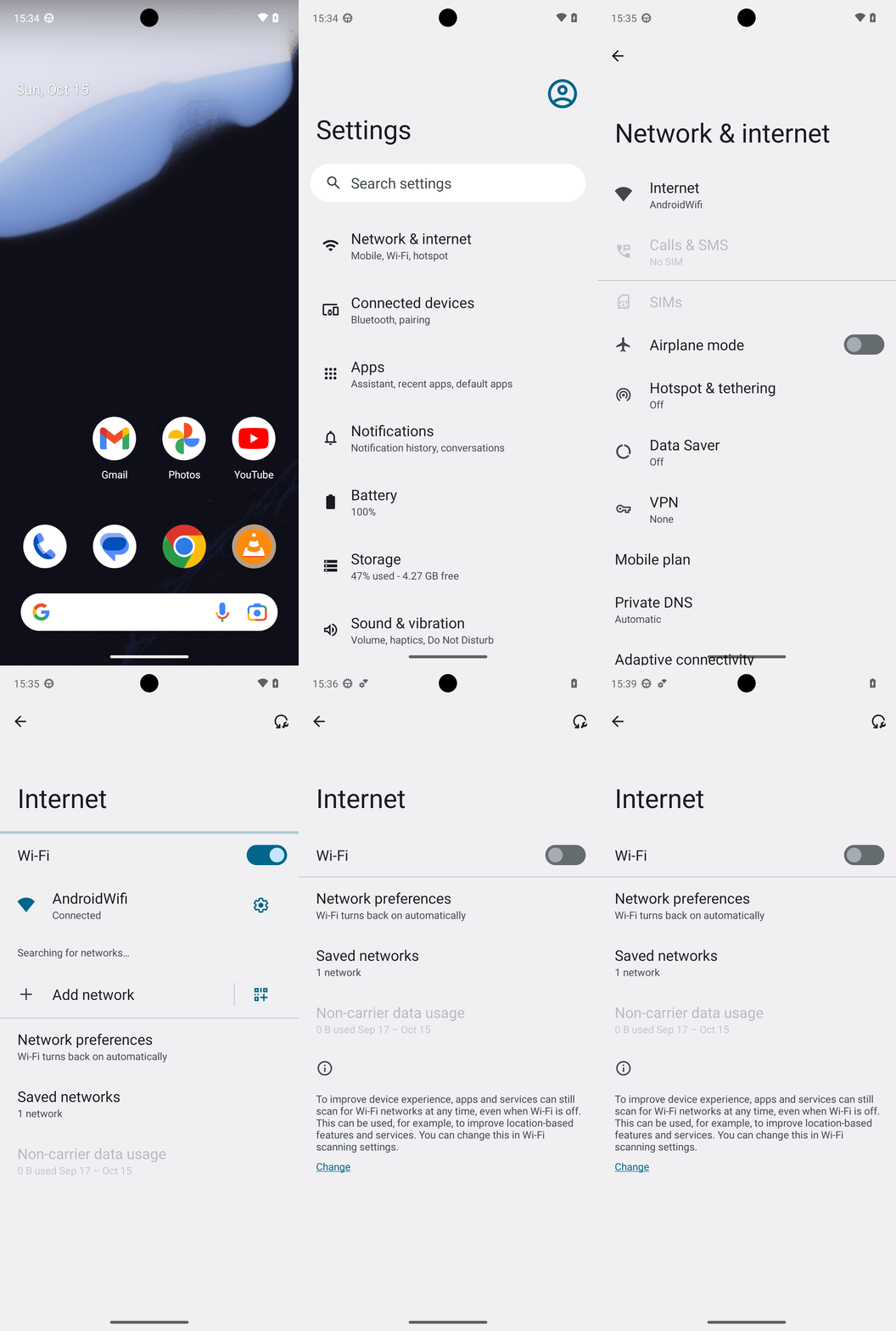
Task Thinking Step 1
Thoughts
The current subgoal explicitly states to "Open the Settings app using open_app." This requires the `open_app` action with the argument "Settings".
Code
open_app(text="Settings")
Task Execution Result
Output
Open the "Settings" app.
Task End
Success reason
Open the "Settings" app.
Success
Task Thinking Step 2
Thoughts
The current subgoal is "Tap “Network & internet”." I need to find the element with the text "Network & internet" and perform a click action on it. Based on the provided UI elements, element 11 has the text "Network & internet".
Code
click(index=11)
Task Execution Result
Output
Tap "Network & internet".
Task End
Success reason
Tap "Network & internet".
Success
Task Thinking Step 3
Thoughts
The current subgoal is to "Tap “Internet”". I need to find the element with the text "Internet" and perform a click action on it. Based on the provided UI elements, element 7 has the text "Internet".
Code
click(index=7)
Task Execution Result
Output
Tap the "Internet" option.
Task End
Success reason
Tap the "Internet" option.
Success
Task Thinking Step 4
Thoughts
The current subgoal is to tap the "Wi-Fi" switch with index 10. I will use the `click` action with the specified index.
Code
click(index=10)
Task Execution Result
Output
Tap the Wi-Fi switch to turn it off.
Task End
Success reason
Tap the Wi-Fi switch to turn it off.
Success
Plan Thinking
Thoughts
Wi‑Fi has been turned off successfully.
Code
complete_goal(message="Wi‑Fi has been turned off successfully.")